Build & query a search index in minutes.
Flatseek is a disk-first trigram search engine. Build a memory-mapped index from CSV, JSON, or JSONL — and query it via dashboard, REST API, or Python library.
Search
Wildcards, fuzzy match, phrase, AND/OR/NOT, ranges. Works on any text field — no schema required.
Aggregations
Terms, stats, date histogram, cardinality — computed on disk without loading docs into RAM.
Map view
Plot geo-tagged documents on Leaflet maps with automatic marker clustering up to 50K points.
Encrypted indices
ChaCha20-Poly1305 encryption with PBKDF2 key derivation. Passphrase-protected at rest.
Index architecture
When you build an index, Flatseek lays out the following structure on disk:
./data/
├── docs/        # Column-oriented doc store — compressed
├── index/       # Trigram posting lists — memory-mapped, binary
├── mapping.json # Column types
└── stats.json # File statsFlatseek never loads the full index into RAM. The OS handles page-in/page-out. Resident memory stays low regardless of index size.
Functions
Core capabilities
- Trigram index on disk — Memory-mapped I/O. Resident memory stays low regardless of index size.
- Sub-second queries — Trigram postings skip lists narrow the search space fast, even on spinning disks.
- Lucene-style query syntax — Wildcards, fuzzy, AND/OR/NOT, phrase match, field filters.
- On-disk aggregations — Terms, stats, date_histogram, cardinality. No doc loaded into heap.
- ChaCha20-Poly1305 encryption — Passphrase-protected indices with PBKDF2-HMAC-SHA256 key derivation.
- Parallel multi-worker builds — Auto-planning, resume on interrupt, ETA display.
- Dual-mode Python client — API mode (HTTP) or direct mode (local files).
- REST API + CLI —
flatseek build,flatseek serve,flatseek search, and more.
Supported file formats
| Format | Extension | Notes |
|---|---|---|
| CSV | .csv | Auto-detect delimiter (comma, tab, semicolon, pipe, hash) |
| JSON | .json | Array of objects: [{"name":"Alice",…}, …] |
| JSONL | .jsonl, .ndjson | One object per line |
| Excel | .xls, .xlsx | SheetJS parsing, sheet selection via CLI flag |
Query capabilities
| Type | Example | Description |
|---|---|---|
| Wildcard | signer:*7xMg* | Contains "7xMg" anywhere |
| Field filter | program:raydium | Exact match on program field |
| Phrase match | "close account" | Exact phrase |
| Boolean | program:raydium AND signer:*7xMg* | AND / OR / NOT |
| Range | bid:[50 TO 200] | Numeric or date ranges |
| Fuzzy | callsign:GARUDA~1 | Edit-distance fuzzy match |
Install
One-line install — recommended
This installs both the flatseek CLI and the flatlens dashboard to ~/.local/share/flatlens.
pip
pip install flatseekCLI and Python package only. The dashboard must be installed separately or via the install script.
From source
git clone https://github.com/flatseek/flatseek.git
cd flatseek
pip install -e .
Install Flatlens Dashboard
git clone https://github.com/flatseek/flatlens.git ~/.local/share/flatlensVerify
flatseek --versionDashboard flow — Flatlens
Flatlens is the web UI for day-to-day CSV work. Just open your browser and start exploring data.
Start the dashboard
Point flatseek serve at your data directory and open the dashboard URL.
flatseek serve -d ./data
# → API:       http://localhost:8000
# → Dashboard: http://localhost:8000/dashboardUpload a file
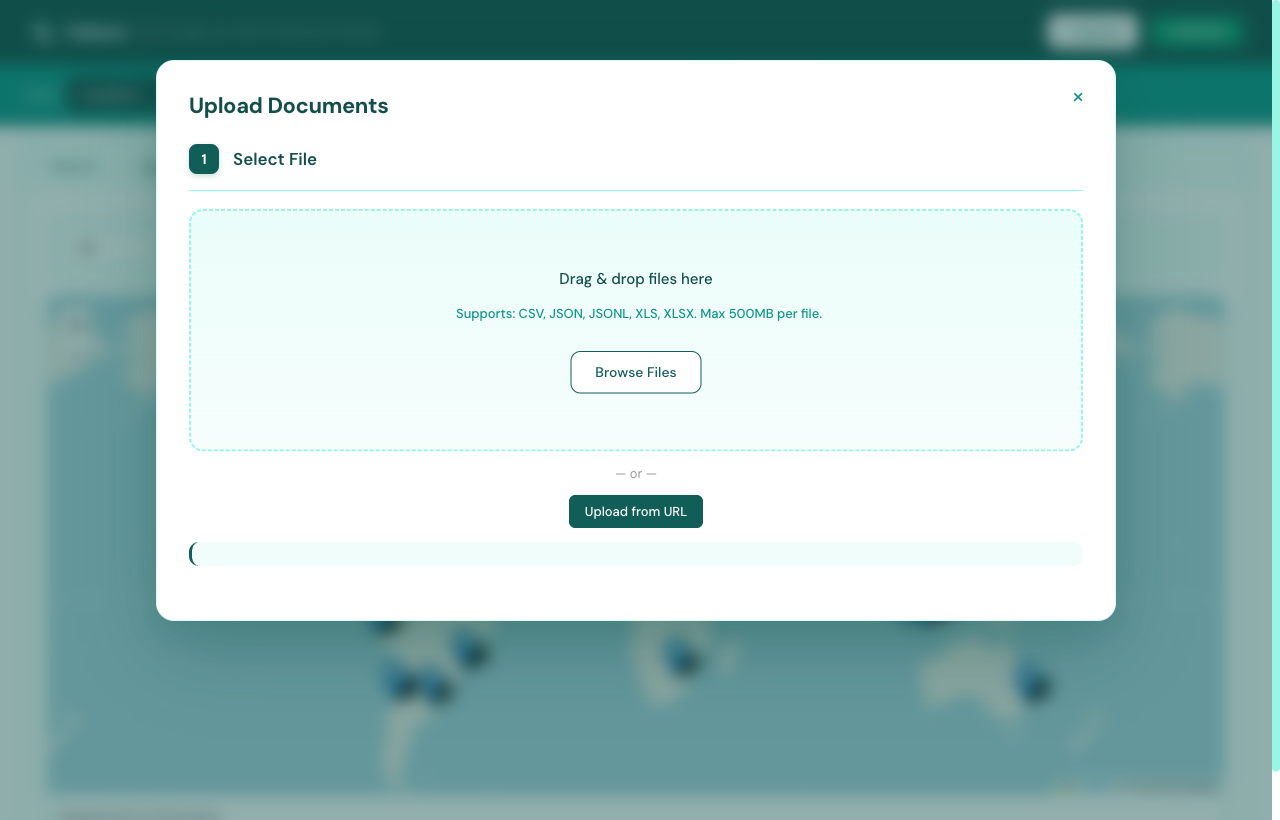
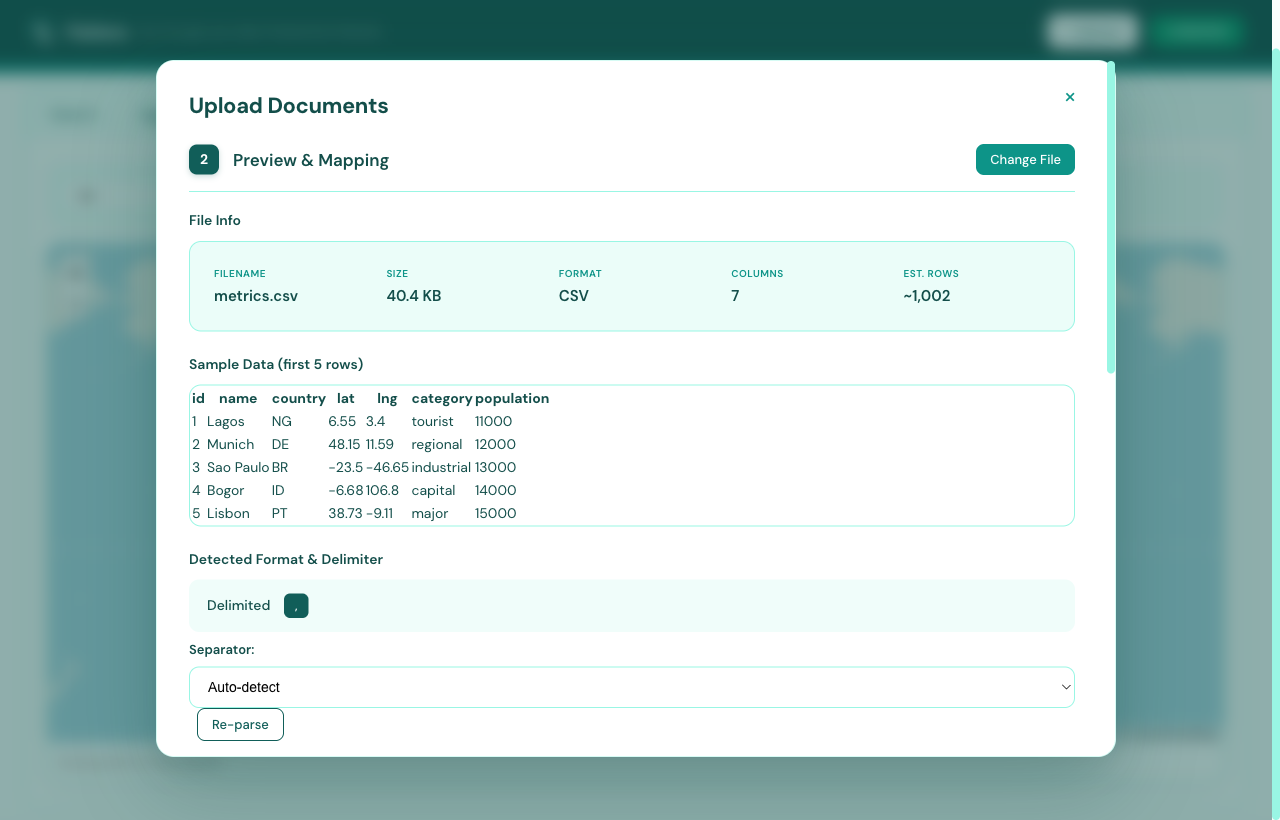
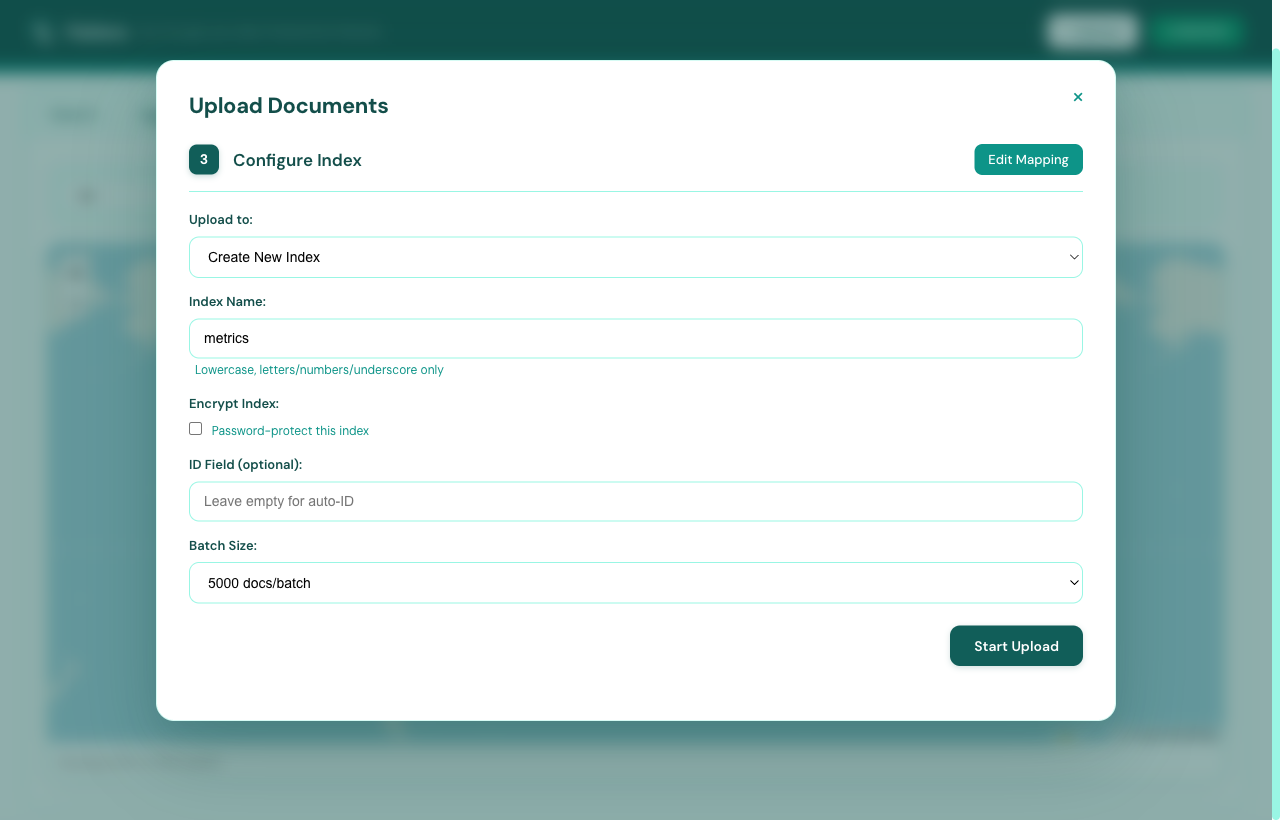
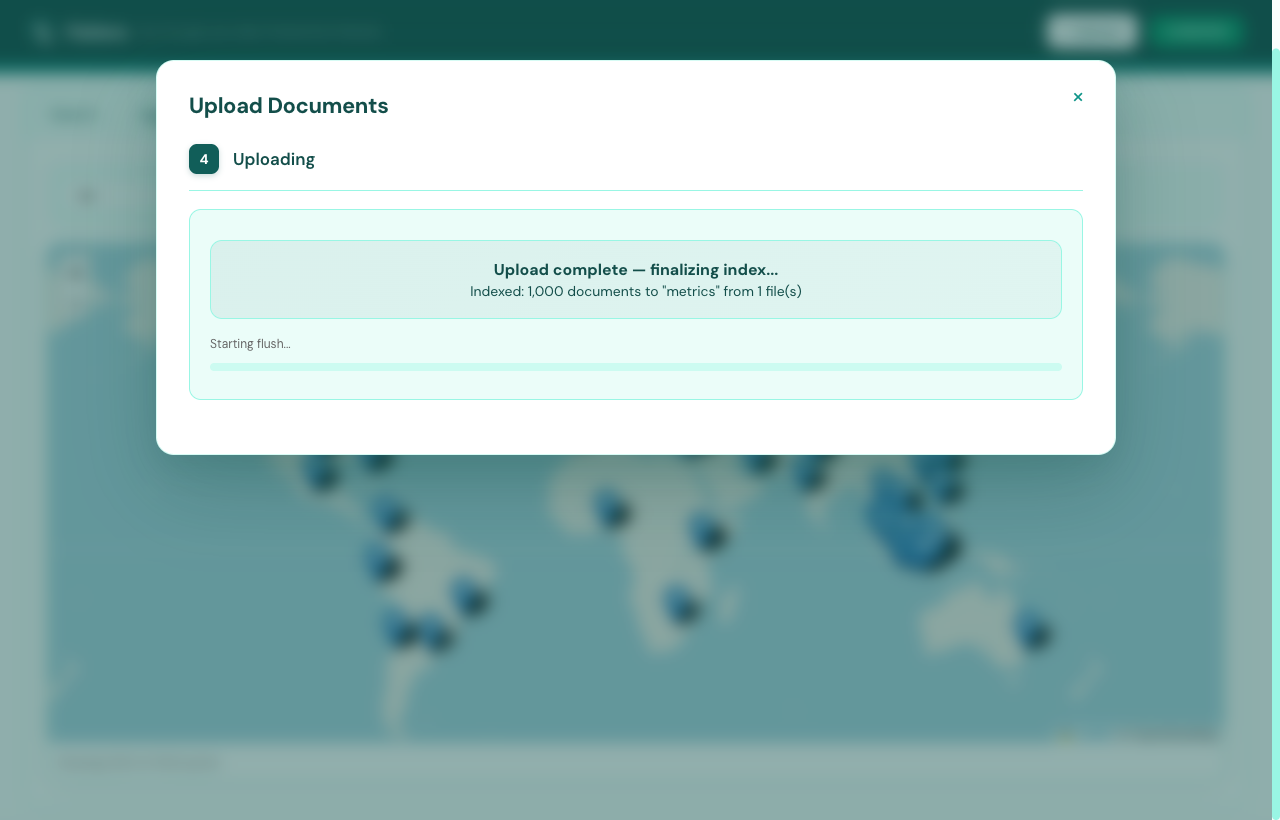
Click + Upload in the top-right corner. Drag-drop or browse — CSV, JSON, JSONL, XLS, XLSX all supported up to 500 MB. Flatlens walks you through four sub-steps: drop, preview, configure, and ingest.
Search
Select your index from the dropdown, type a query, and hit Search. Use the visual filter builder or write Lucene-style queries directly:
program:raydium AND signer:*7xMg*  # Blockchain DeFi
callsign:GARUDA* AND altitude:>30000 # Aviation ADS-B
level:ERROR AND service:api-gateway     # DevOps logs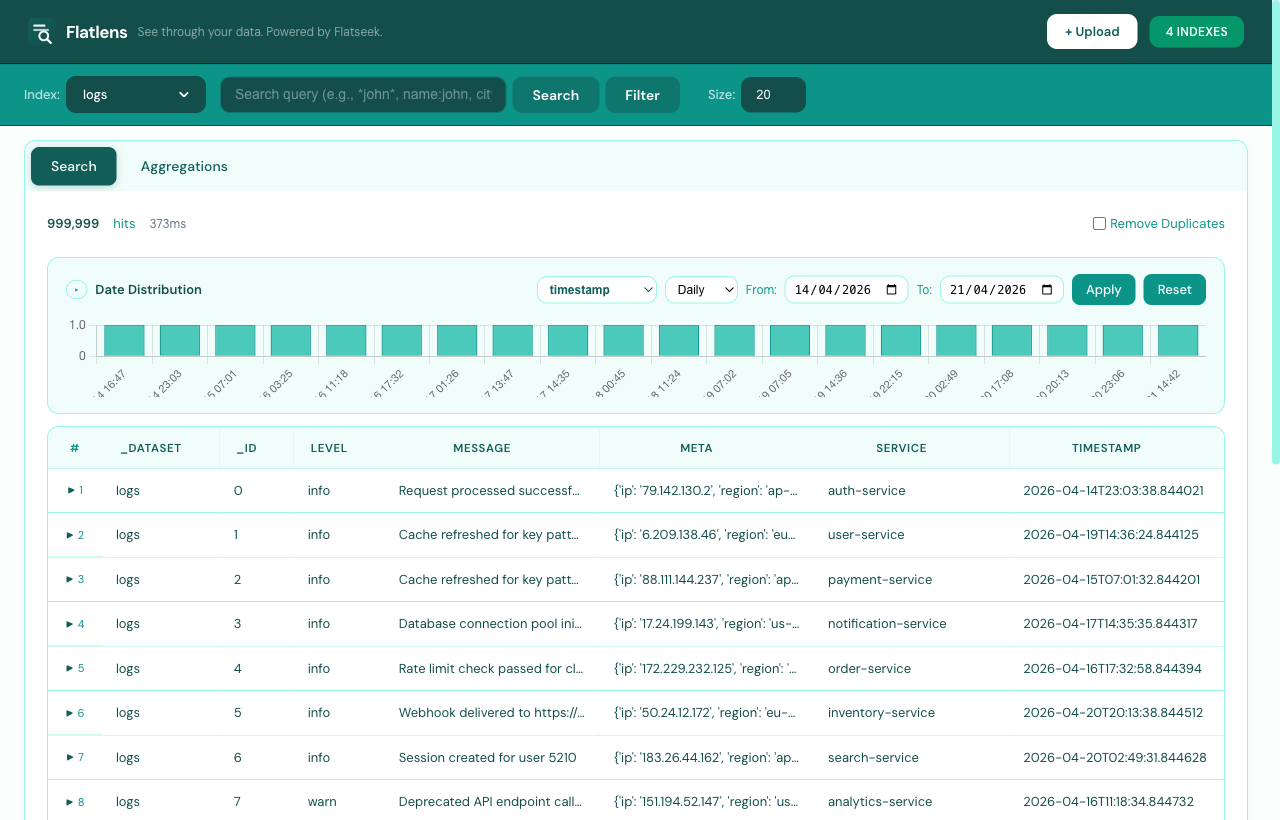
Aggregate & chart
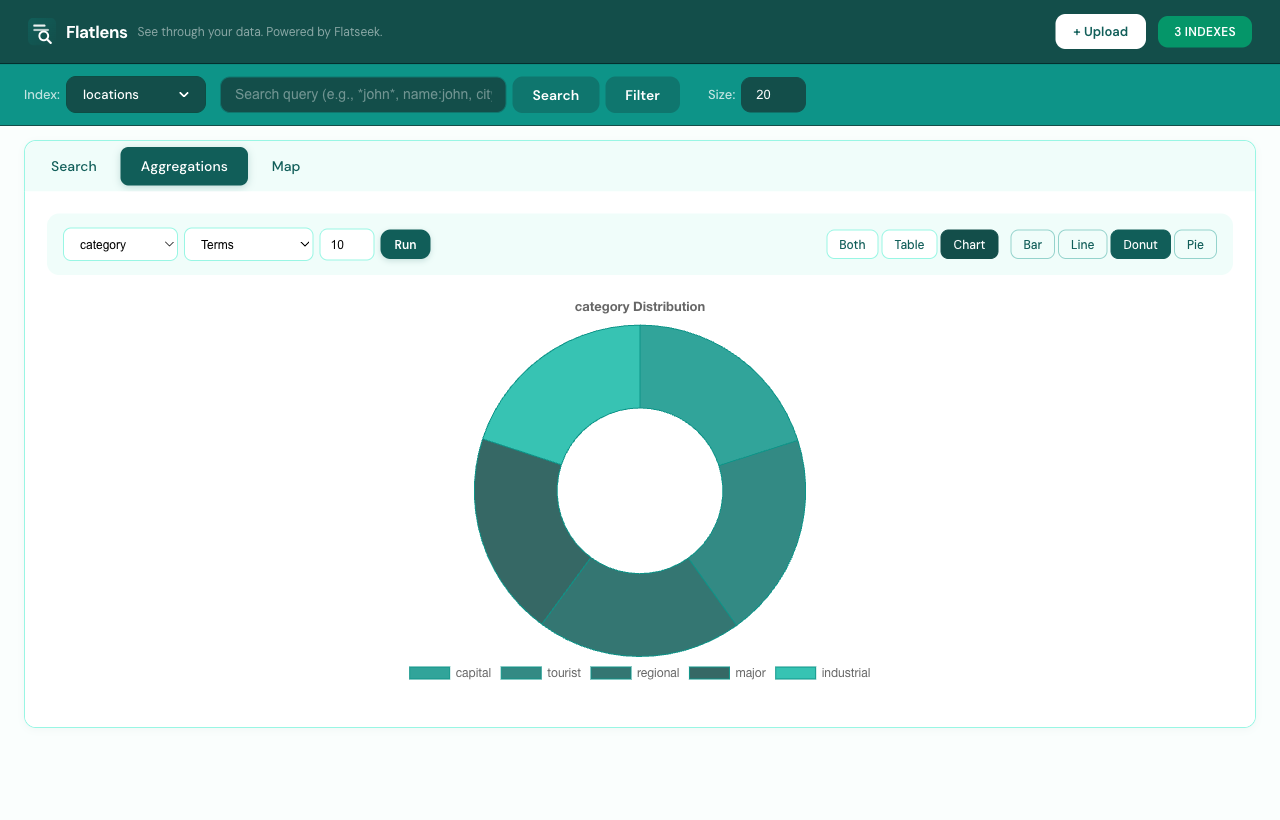
Go to the Aggregations tab. Choose a type (Terms, Stats, Date Histogram, avg, min, max, sum, cardinality), pick a column, and render as Bar, Line, Donut, or Pie.
Example: date_histogram on created_at with interval day shows daily signup trends.
Map
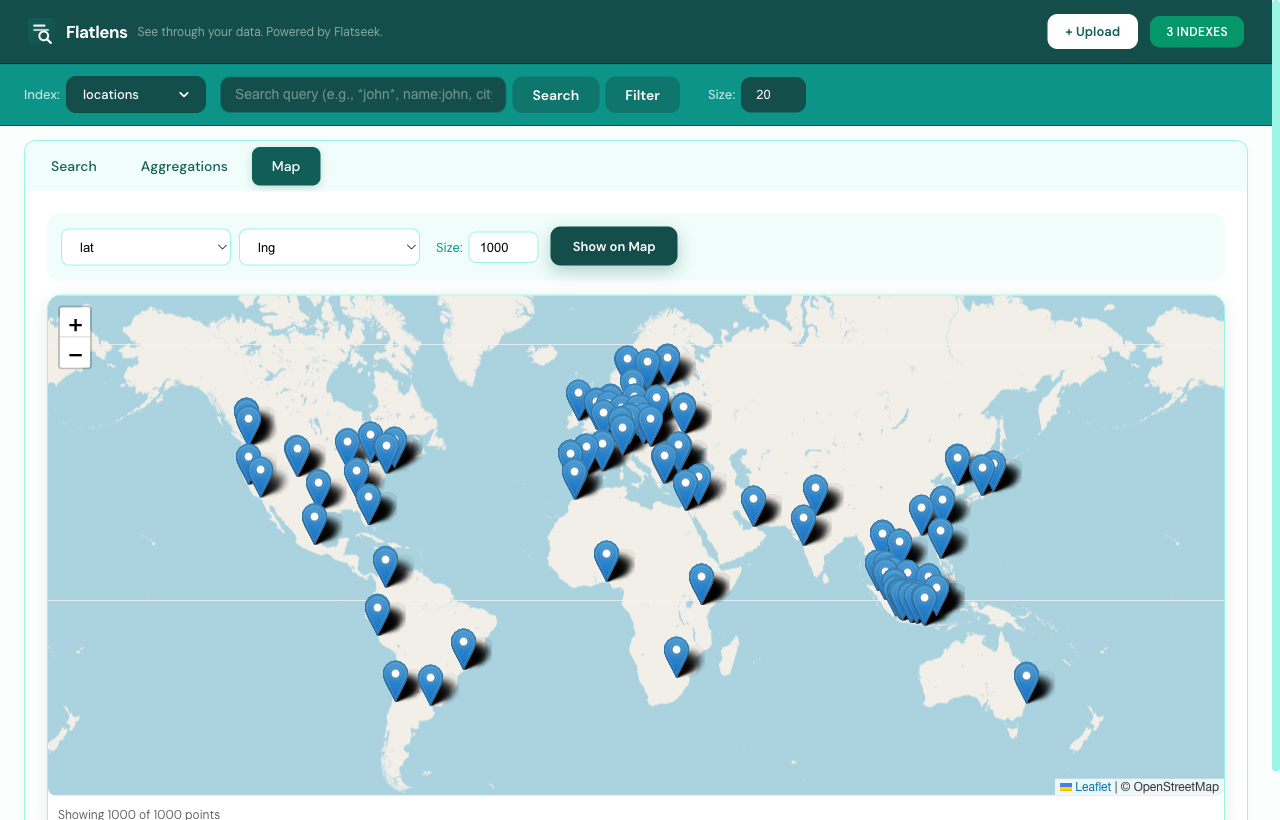
Go to the Map tab. Flatlens auto-detects lat/lng or latitude/longitude columns. Up to 50,000 geo-tagged points render with marker clustering.
Manage indexes
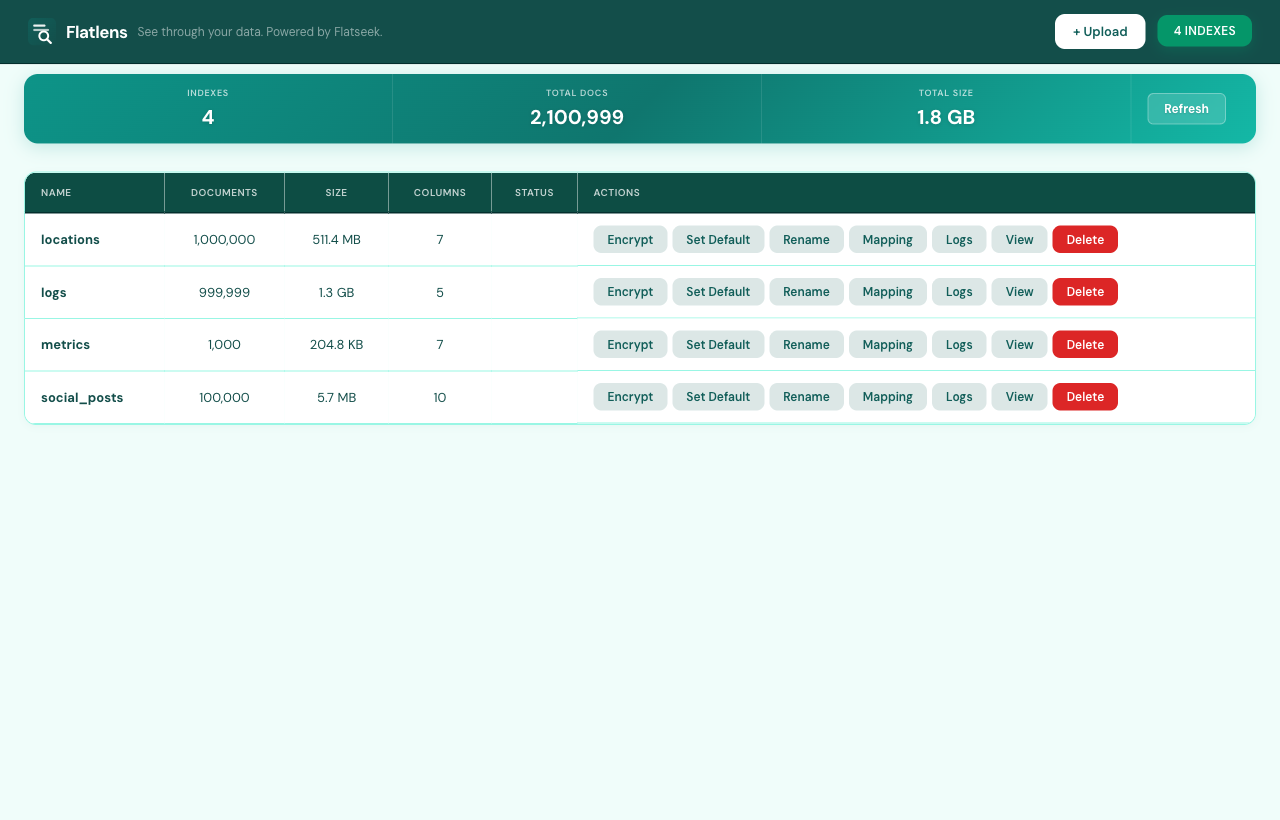
Click the indexes badge in the top-right to open the manage view. Totals across all indexes sit on top — doc count, size, file count — followed by a per-index table with one-click Encrypt, Rename, Mapping, Logs, View, and Delete. Encrypted indexes prompt for the passphrase on access.
Command Line (CLI) — advanced
For production scale, automation, and embedding in services. Parallel workers, direct file access, and scripted pipelines.
CLI workflow
# 1. Build an index (multi-worker for large files)
flatseek build ./data/solana_txs.csv -o ./data -w 4

# 2. Search from CLI — industry-specific queries
flatseek search ./data "program:raydium AND signer:*7xMg AND amount:>1000000"
flatseek search ./data "level:ERROR AND service:api-gateway AND region:us-east1" -n 50
flatseek search ./data "callsign:GARUDA* AND altitude:>30000"
flatseek search ./data "status:active AND country:ID AND campaign:*promo*"

# 3. Stats
flatseek stats ./data

# 4. Plan (show build strategy without executing)
flatseek plan ./data/solana_txs.csv

# 5. Compress (after build is done)
flatseek compress ./data -l 6

# 6. Encrypt at rest
flatseek encrypt ./data --passphrase "mysecretpass"

# 7. Dedup
flatseek dedup ./data --fields signature --dry-run

# 8. Delete
flatseek delete ./data --yes
Parallel builds
# Use -w for parallel workers (auto-detects CPU count)
flatseek build ./large.csv -o ./data -w 8

# Estimate before build
flatseek build ./large.csv -o ./data --estimate

# Daemon mode (more RAM, faster)
flatseek build ./large.csv -o ./data --daemon
REST API flow
The Flatseek API is Elasticsearch-compatible. Start the server and query via any HTTP client.
Start the API server
flatseek api -d ./data
# → https://api.demo.flatseek.io/redoc (ReDoc)
# → https://api.demo.flatseek.io/docs (Swagger UI)
List indices
GET /_indicesSearch
GET /{index}/_search?q={query}&size=20&from=0

# Blockchain DeFi — Raydium swaps on Solana
curl "https://api.demo.flatseek.io/solana_txs/_search?q=program:raydium AND signer:*7xMg AND amount:>1000000&size=10"

# Aviation — Garuda flights from Jakarta above 30k ft
curl "https://api.demo.flatseek.io/flights/_search?q=callsign:GARUDA* AND origin:WIII AND altitude:>30000"

# DevOps — API errors in production
curl "https://api.demo.flatseek.io/logs/_search?q=level:ERROR AND service:api-gateway AND region:us-east1"
Or POST body:
POST /{index}/_search
{"query": "program:raydium AND amount:>1000000", "size": 20, "from": 0}Aggregate
POST /{index}/_aggregate
{
  "query": "status:active AND country:ID",
  "aggs": {
    "by_campaign": {"terms": {"field": "campaign", "size": 50}},
    "bid_stats": {"stats": {"field": "bid"}},
    "impression_stats": {"stats": {"field": "impressions"}}
  }
}Encrypt — optional
# Authenticate with passphrase
curl -H "X-Index-Password: mypass" \
     "https://api.demo.flatseek.io/people/_search?q=*john*"
API endpoints
| Method | Endpoint | Description |
|---|---|---|
| GET | /_indices | List all indices |
| GET | /{index}/_search | Search — supports Lucene-style query syntax, wildcards, ranges, boolean |
| GET | /{index}/_count | Count matching documents |
| POST | /{index}/_aggregate | Run aggregations |
| POST | /{index}/_bulk | Bulk index documents |
| GET | /{index}/_stats | Index statistics |
| GET | /{index}/_mapping | Column type mappings |
| DELETE | /{index} | Delete index |
| POST | /{index}/_encrypt | Encrypt index |
| POST | /{index}/_decrypt | Decrypt index |
The API also exposes interactive documentation built with FastAPI. Open in your browser:
- https://api.demo.flatseek.io/docs — Swagger UI, try endpoints directly
- https://api.demo.flatseek.io/redoc — ReDoc, cleaner reference layout
Python Package
Two modes: API mode (HTTP, for remote / client-server) and direct mode (local files, faster).
API mode
from flatseek import Flatseek

client = Flatseek("https://api.demo.flatseek.io")

# Blockchain — Raydium swaps on Solana
result = client.search(index="solana_txs", q="program:raydium AND signer:*7xMg AND amount:>1000000", size=20)
print(f"Found: {result.total}")
for doc in result.docs:
    print(doc["signature"], doc["status"], doc["fee"])

# AdTech — campaign performance
result = client.aggregate(
    index="ad_campaigns",
    body={
        "query": "status:active AND country:ID",
        "aggs": {
            "by_campaign": {"terms": {"field": "campaign", "size": 50}},
            "bid_stats": {"stats": {"field": "bid"}}
        }
    }
)
print(result.aggs["by_campaign"])

# Bulk insert
client.bulk_insert(index="solana_txs", docs=[
    {"signature": "abc123...", "program": "raydium", "amount": 5000000, "fee": 5000},
])
Direct mode
from flatseek import Flatseek

# Open local index directory — no server needed
qe = Flatseek("./data")

# Search DevOps logs
result = qe.search(q="level:ERROR AND service:api-gateway", size=10)
print(result.total, "errors")

# Aggregations on aviation data
result = qe.aggregate(q="altitude:>30000", aggs={
    "by_origin": {"terms": {"field": "origin", "size": 20}},
    "altitude_stats": {"stats": {"field": "altitude"}}
})
buckets = result.aggs["by_origin"]["buckets"]
for b in buckets:
    print(f"{b['key']}: {b['doc_count']}")
TypeScript — flatseek-js
Official ESM/TypeScript client for Node.js and browsers. Wraps the REST API with full type safety.
Install
# From npm
npm install flatseek

# Or from local source
npm install /path/to/flatseek-js
Quick start
import { FlatseekClient } from 'flatseek';

const client = new FlatseekClient('https://api.demo.flatseek.io');

// Search blockchain transactions
const result = await client.search('solana_txs', 'program:raydium AND signer:*7xMg AND amount:>1000000');
console.log(result.total, 'matching transactions');

// Search social media
const tweets = await client.search('twitter_posts', 'lang:id AND sentiment:negative AND retweets:>1000');

// Bulk index
await client.bulkIndex('solana_txs', docsArray);

// Count
const { count } = await client.count('logs', 'level:ERROR AND region:us-east1');
URL upload — preview before indexing
// Preview remote CSV/JSON to inspect headers and sample rows
const preview = await client.previewFromUrl(
  'https://example.com/data.csv',
  'my-index',
  { format: 'auto', sampleSize: 100 }
);
console.log(preview.headers);   // ['signature', 'slot', 'fee']
console.log(preview.total_rows); // 50000

// Then bulk index the full data
const full = await client.fetchFromUrl('https://example.com/data.csv', 'my-index');
await client.bulkIndex('my-index', full.records);
await client.flush('my-index');
Core methods
| Method | Description |
|---|---|
search(index, query, opts?) | Search with Lucene-style query |
searchAll(query, opts?) | Search across all indices |
count(index, query?) | Count matching documents |
bulkIndex(index, docs, opts?) | Bulk index with optional progress callback |
createIndex(name, opts?) | Create new index, optionally encrypted |
flush(index) | Flush in-memory data to disk |
aggregate(index, query, aggs) | Run term/avg/sum/histogram aggregations |
previewFromUrl(url, index, opts?) | Fetch and preview remote file headers + sample rows |
fetchFromUrl(url, index, format?) | Fetch full dataset from remote URL |
encryptIndex(index, passphrase) | Encrypt index in-place |
decryptIndex(index, passphrase) | Decrypt encrypted index |
isEncrypted(index) | Check if index is encrypted |
authenticate(index, passphrase) | Unlock encrypted index |
deleteIndex(index) | Delete an index |
indexStats(index) | Get index statistics |
getMapping(index) | Get column type mapping |
listIndices() | List all indices |
clusterHealth() | Cluster health check |
The client is fully typed in TypeScript with included .d.ts declaration files. All methods throw FlatseekError on failure with status and detail fields.
Query syntax reference
Operators
| Pattern | Example | Description |
|---|---|---|
word | raydium | Contains term (implicit AND for multiple words) |
*ord | *GARUDA* | Wildcard — contains |
wo*d | promo* | Wildcard — prefix match |
"exact phrase" | "Connection timeout" | Exact phrase match |
AND / OR / NOT | level:ERROR AND service:api-gateway | Boolean operators (uppercase) |
( ) | (level:ERROR OR level:WARN) AND region:us-east1 | Grouping |
field:[min TO max] | altitude:[30000 TO 40000] | Range query |
field:value | status:active AND country:ID | Field filter + boolean |
Special characters
Escape with \ to search literally:
+ - && || ! ( ) { } [ ] ^ " ~ * ? : \ /Example: john\+doe matches the literal string john+doe.
Column types
Column types control how values are indexed and queried.
| Type | Indexed as | Query style | Use for |
|---|---|---|---|
TEXT | Trigrams + tokenization | Wildcard, contains | Free text, descriptions |
KEYWORD | Exact value | Equals, terms aggregation | Tags, status, category |
DATE | ISO date (YYYYMMDD) | Range queries, date_histogram | Timestamps, birthdays |
FLOAT | Numeric value | Range, stats aggregation | Price, latitude, score |
INT | Integer value | Range, stats aggregation | Age, quantity, count |
BOOL | Boolean | Equals | is_active, is_verified |
ARRAY | JSON array | Contains | tags, interests |
OBJECT | JSON object | Dot-path access | address.city, profile.name |
Sample data schemas
These are the canonical datasets used throughout the examples. Build indices from CSVs matching these schemas to follow along.
Blockchain / DeFi — Solana transactions
signature, slot, timestamp, fee, status, signer, num_accounts, compute_units, programs
5xJ3k..., 250000000, 2026-01-01T00:00:00Z, 5000, success, 7xMg3..., 10, 200000, raydium|jupiter
3Ab2k..., 250000001, 2026-01-01T00:01:00Z, 5000, failed,   9kL2n...,  8, 180000, raydium
Social media / CRM — Twitter / Threads
post_id, platform, author, username, timestamp, text, lang, likes, retweets, sentiment, region
123456, twitter, Budi Santoso, @budi_s, 2026-01-01T08:00:00Z, "Baru naik harga🚨", id, 2400, 340, negative, ID-JK
123457, threads, Siti Aminah, @siti,   2026-01-01T08:05:00Z, "Produknya enak banget", id, 8900, 120, positive, ID-JK
DevOps / SRE — System logs
timestamp, level, service, host, region, message, trace_id, duration_ms, status_code
2026-01-01T00:01:00Z, ERROR, api-gateway, host-03, us-east1, Connection timeout to payment-svc, 9f3a2c, 5000, 504
2026-01-01T00:02:00Z, WARN,  auth-service, host-01, us-east1, Token near expiry, 8a1b3d,   50, 200
2026-01-01T00:03:00Z, INFO,  worker-queue, host-07, eu-west1, Job processed: batch_4412, 2c4d5e,  120, 200
Aviation / ADS-B — Flight tracking
icao_address, callsign, origin, destination, altitude, speed, heading, lat, lon, timestamp, status
8A1234,      GARUDA351, WIII,    WSSS,       35000,   480,  320,   -6.125, 106.655, 2026-01-01T08:00:00Z, airborne
8A5678,      LION238,   WIII,    WSSB,       38000,   510,  315,   -6.118, 106.810, 2026-01-01T08:01:00Z, airborne
AdTech / DSP — Campaign performance
campaign_id, campaign_name, advertiser, country, status, bid, impressions, clicks, ctr, budget, start_date, end_date
C001, brand_promo_jkt, Nike,   ID, active,  150, 1200000, 48000, 4.0, 50000000, 2026-01-01, 2026-03-31
C002, summer_sale_sg,  Uniqlo, SG, paused,    80,  340000, 10200, 3.0, 20000000, 2026-01-15, 2026-02-28
C003, tech_brand_id,   Samsung, ID, active,  200, 8900000, 356000, 4.0, 100000000, 2026-01-01, 2026-06-30
Aggregation types
| Type | Description | Key output fields |
|---|---|---|
terms | Group by unique values | buckets[{"key": …, "doc_count": …}] |
stats | Statistical summary | count, min, max, sum, avg |
date_histogram | Time-series grouping | buckets[{"key_as_string": …, "doc_count": …}] |
avg | Average value | value |
min | Minimum value | value |
max | Maximum value | value |
sum | Sum of values | value |
cardinality | Unique value count | value (approximate) |
CLI command reference
| Command | Description |
|---|---|
flatseek build <file> | Build index from CSV/JSON/JSONL/XLS. Use -o for output dir, -w N for parallel workers. |
flatseek serve | Start API server + Flatlens dashboard. Use -d for data dir, -p for port. |
flatseek api | Start API server only (no dashboard). |
flatseek search <dir> <query> | Search from CLI. Use -c for column filter, -n for page size. |
flatseek stats <dir> | Show index statistics. |
flatseek plan <file> | Show build plan without executing. |
flatseek classify <file> | Detect column types without building. |
flatseek compress <dir> | Compress index files with zlib. Use -l for level (1-9). |
flatseek encrypt <dir> | Encrypt with ChaCha20-Poly1305. Use --passphrase. |
flatseek decrypt <dir> | Decrypt with passphrase. |
flatseek dedup <dir> | Remove duplicate docs. Use --fields to specify columns. |
flatseek delete <dir> | Delete index. Use --yes to skip confirm. |
flatseek join <dir> | Cross-dataset join on shared field. |
flatseek chat <dir> | Natural language query via Ollama. Use --model to specify LLM. |
Use flatseek <command> --help for detailed options on any command.