v0.10 The Elasticsearch alternative without the 24/7 server costs.

Search engines
shouldn't cost
a fortune.

Flatseek is a search engine without always-on infrastructure. No JVM, no clusters—just query CSV, JSON, or XLSX directly, from daily use to production scale.

$ curl -fsSL flatseek.io/install.sh | sh
or pip install flatseek

macOS · Linux · Python 3.11+  ·  View source on GitHub

~80%
Lower infrastructure cost vs Elasticsearch
~40%
Smaller index footprint on disk
0
JVM heap parameters to tune
0/mo
Only storage cost to run a full index
Cost & Footprint

Stop paying for hardware
you don't need.

Elasticsearch's JVM heap and cluster requirements add up fast. Flatseek stores everything on disk, memory-mapped — serverless is enough.

Comparison
Trigram, disk-first vs JVM cluster
Open source
Flatseek New
Industry default
Elasticsearch
Infrastructure
On demand serverless
Dedicated cluster, 64GB RAM
Long-running node
Query and exit
Required 24/7
JVM heap tuning
None
Per-deployment
Index size on disk
Compact trigram
Inverted, 2–3× larger
Dashboard included
Built-in Flatlens
Separate Kibana license
Memory residency
OS-managed mmap
Heap-resident
Bottom line
Only cost you storage.
You pay for cluster + heap + ops.
Two surfaces

Pick what fits
your workflow.

Flatlens for analysts who want quick explore in local. CLI & Python for engineers shipping it into production.

Dashboard

Flatlens — for day-to-day CSV work

Open a CSV in your browser. Search it, chart it, map it. Built for analysts.

  • Drag-drop CSV, JSON, JSONL, XLS & XLSX
  • Visual search with a filter builder
  • Bar, line, donut & pie aggregations
  • Interactive Leaflet map with clustering
  • Encrypt indices with a passphrase
Read the Flatlens guide
CLI & API

CLI & Python — for production scale

Run massive datasets across domains — transactions, logs, metrics, events, and analytics. Ingest from CSV, JSON, and index dumps. Automate pipelines, scale with parallel workers, and serve via REST API.

  • flatseek build · serve · search · stats · plan
  • Parallel multi-worker indexing with resume
  • Cross-index joins on shared fields
  • Python client — API mode or direct mode
  • Natural language chat via Ollama
Read the CLI & API docs
Capabilities

Everything you need
from a search engine.

The features you'd expect from Elasticsearch, minus the infrastructure.

Multi-format ingest

CSV, JSON, JSONL, XLS, XLSX. Auto-detects delimiters and column types on import.

Disk-native queries

Memory-mapped trigram index. Resident memory stays low, regardless of index size.

Full-text search

Wildcards, fuzzy, phrase. AND / OR / NOT with grouping. Works on every text field.

On-disk aggregations

Terms, stats, date histograms, cardinality. Computed without loading docs into RAM.

ChaCha20-Poly1305 encryption

Passphrase-protected indices with PBKDF2-HMAC-SHA256 key derivation.

Parallel builds with resume

Multi-worker indexing with auto-planning. Resume interrupted builds with ETA display.

Live CLI

A million rows indexed
under 5 minutes

flatseek  —  ~/projects/locations  —  zsh
$flatseek build flatdata/data/solana_txs.csv -o ./solana_txs -w 8
── Pre-classify ──────────────────────────────────────
Classify solana_txs.csv:
'signature'KEYWORD (100%)
'slot'FLOAT (100%)
'timestamp'DATE (100%)
'fee'FLOAT (100%)
'status'KEYWORD (100%)
'signer'KEYWORD (100%)
'compute_units'FLOAT (100%)
'programs'KEYWORD (100%)
Counting rows in 1 file(s)...
solana_txs.csv: ~1,000,000 rows (128.4 MB)
Single file — splitting into 8 byte-range chunks (O(1) seek)...
Plan written: ./solana_txs/build_plan.json
── Launching 8/8 workers ─────────────────────────────
Worker 0 pid 52067 log → worker_0.log
Worker 1 pid 52068 log → worker_1.log
Worker 2 pid 52069 log → worker_2.log
Worker 3-7 …
Wrowsstateckptencodediskmemckpt_r
✓ 0126,754flush221.2s2.7s43MB99%
✓ 1124,757flush221.1s3.0s43MB99%
✓ 2124,742flush220.8s2.8s44MB99%
✓ 3124,757flush221.0s3.5s44MB99%
✓ 4124,759flush221.4s3.1s44MB99%
✓ 5124,750flush221.3s3.3s44MB99%
✓ 6124,733flush220.8s3.0s44MB99%
✓ 7124,748flush221.9s3.2s46MB99%
100.0% 1,000,000 / 1,000,000 · 4m42s elapsed
── Workers done (4m42s) ─────────────────────────────
Worker 0 [done] 126,754 new rows (total: 126,754 docs)
Worker 1 [done] 124,757 new rows (total: 424,757 docs)
Worker 2 [done] 124,742 new rows (total: 724,742 docs)
Worker 3 [done] 124,757 new rows (total: 1,024,757 docs)
Worker 4-7 …
── Merging stats ─────────────────────────────────────
Merged stats: 1,000,000 docs, 18,432,000 entries, 341.2 MB
All 8 workers completed.
$# Blockchain DeFi — Raydium swaps over 1M lamports
$flatseek search ./solana_txs "program:raydium AND signer:*7xMg* AND amount:>1000000" -n 3
Query: program:raydium AND signer:*7xMg* AND amount:>1000000
Found: 4,821 match(es) (page 1, showing 3)
--- 1 ---
DOC {'_id': 8821, 'signature': '5xJ3k9...LPv7m', 'slot': '415172685', 'program': 'raydium', 'signer': '7xMg3K...xpLR2', 'amount': '2500000', 'fee': '5000', 'status': 'success'}
--- 2 ---
DOC {'_id': 8822, 'signature': '3Ab2kP...QmR8w', 'slot': '415172686', 'program': 'raydium', 'signer': '7xMg3K...xpLR2', 'amount': '1750000', 'fee': '5000', 'status': 'success'}
--- 3 ---
DOC {'_id': 8823, 'signature': '1CdefG...BnK9x', 'slot': '415172687', 'program': 'raydium', 'signer': '9kL2nP...QmR8w', 'amount': '3200000', 'fee': '5000', 'status': 'failed'}
$# Field filter + boolean AND
$flatseek search ./solana_txs "program:jupiter AND status:success" -n 2
Query: program:jupiter AND status:success
Found: 127,445 match(es) (page 1, showing 2)
DOC {'_id': 401, 'signature': 'Jup8Xk...LpR2m', 'program': 'jupiter', 'signer': '3kL2nP...QmR8w', 'amount': '980000', 'fee': '5000', 'status': 'success'}
DOC {'_id': 403, 'signature': 'Jup9Ym...KpS3n', 'program': 'jupiter', 'signer': '7xMg3K...XpLR2', 'amount': '1500000', 'fee': '5000', 'status': 'success'}
$# Wildcard prefix + numeric range
$flatseek search ./solana_txs 'signer:*7xMg* AND fee:[4000 TO 6000]' -n 2
Query: signer:*7xMg* AND fee:[4000 TO 6000]
Found: 89,312 match(es) (page 1, showing 2)
DOC {'_id': 12, 'signature': 'TxA4Rm...KpL9n', 'signer': '7xMg3K...xpLR2', 'fee': '5000', 'status': 'success'}
DOC {'_id': 18, 'signature': 'TxB5Sn...LpR8m', 'signer': '7xMg3K...xpLR2', 'fee': '5000', 'status': 'success'}
$flatseek stats ./solana_txs
Docs: 1,000,000
Index: 341.2 MB (524288 files)
Doc store: 128.4 MB
Total: 341.2 MB
Columns:
signature KEYWORD
slot FLOAT
timestamp DATE
fee FLOAT
status KEYWORD
signer KEYWORD
programs KEYWORD
$# Plan a build without executing
$flatseek plan ./solana_txs.csv -o ./solana_txs
Counting rows in 1 file(s)...
solana_txs.csv: ~1,000,000 rows (128.4 MB)
Single file — splitting into 4 byte-range chunks (O(1) seek)...
Plan written: ./solana_txs/build_plan.json
Worker 0: bytes [0…32,194,512] (32 MB) ~250,000 rows
Worker 1: bytes [32,194,512…64,389,024] (32 MB) ~250,000 rows
Worker 2: bytes [64,389,024…96,583,536] (32 MB) ~250,000 rows
Worker 3: bytes [96,583,536…128,777,988] (32 MB) ~250,000 rows
$flatseek serve -d ./solana_txs -p 8000
2026-04-22 09:58:01 [INFO] flatseek.api.main: Flatlens dashboard mounted at /dashboard
INFO: Will watch for changes in these directories: ['./solana_txs']
INFO: Uvicorn running on http://0.0.0.0:8000 (Press CTRL+C to quit)
Starting Flatseek API + Dashboard on 0.0.0.0:8000
Data directory: ./solana_txs
API: http://api.demo.flatseek.io
Dashboard: https://flatlens.demo.flatseek.io
Opening dashboard in browser...
Press Ctrl+C to stop
2026-04-22 09:58:02 [INFO] Started server process [52729]
INFO: Application startup complete.
127.0.0.1:50021 - "GET /dashboard HTTP/1.1" 302 Found
127.0.0.1:50021 - "GET /dashboard/ HTTP/1.1" 200 OK
127.0.0.1:50029 - "GET /solana_txs/_search?q=program:raydium HTTP/1.1" 200 OK
$# Run aggregations via REST — no doc loaded into RAM
$curl -X POST https://api.demo.flatseek.io/solana_txs/_aggregate \
-H "Content-Type: application/json" -d '{
"query": "program:raydium AND status:success",
"aggs": {
"by_status": { "terms": { "field": "status", "size": 5 } },
"fee_stats": { "stats": { "field": "fee" } }
}
}'
{ "took": 38, "hits": { "total": 127445 }, "aggregations": { "by_status": { "buckets": [ { "key": "success", "doc_count": 98291 }, { "key": "failed", "doc_count": 29154 } ] }, "fee_stats": { "count": 127445, "min": 5000, "max": 10000, "avg": 5024.7, "sum": 640284215 } } }
$python
Python 3.11.6 (main, Oct 2 2023, 13:45:54) on darwin
›››from flatseek import Flatseek
›››qe = Flatseek("./solana_txs") # direct mode — no server needed
›››r = qe.search(q="program:raydium AND signer:*7xMg*", size=2)
›››print(f"total = {r.total:,}")
total = 2,314
›››for doc in r.docs:
... print(doc["signature"], doc["program"], doc["fee"])
41nAGJ…hBx9 raydium 5000
3KqD3y…LpQX raydium 5000
›››agg = qe.aggregate(q="*", aggs={
... "by_program": {"terms": {"field": "program", "size": 5}}
...})
›››[(b["key"], b["doc_count"]) for b in agg.aggs["by_program"]["buckets"]]
[('raydium', 892147), ('jupiter', 721089),
('orca', 431202), ('meteora', 289401)]
Live UI · Flatlens

Or stay in the browser.
Drop, query, chart, map.

Flatlens is the dashboard that ships with Flatseek. Drop a file and you get a working search engine, aggregations, and a world map — without typing a single command.

/dashboard
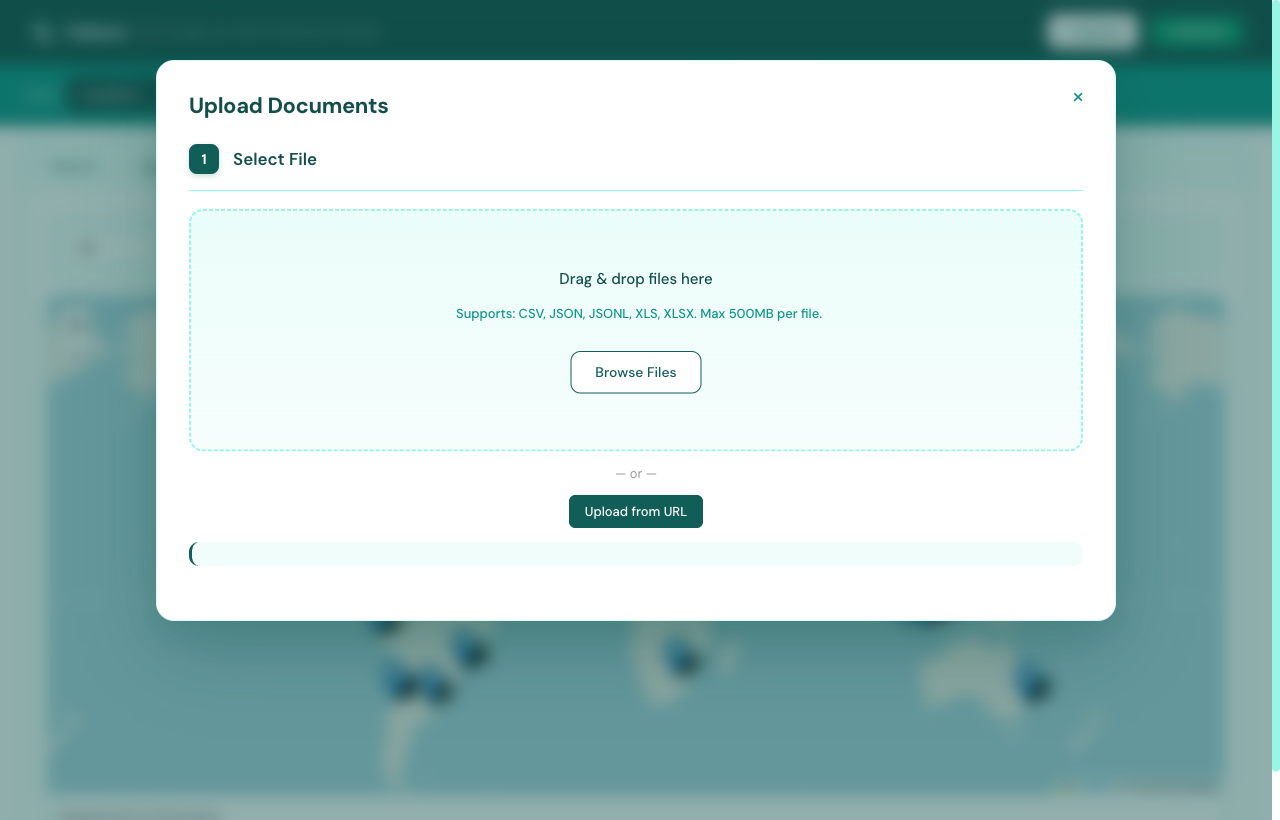
Flatlens — drag and drop upload modal
Step 01 / Drop the file

Drag a file in. That's it.

Open the dashboard, hit + Upload, and drop a CSV, JSON, JSONL, XLS, or XLSX up to 500 MB. Or paste a URL.

  • CSV, JSON, JSONL, XLS, XLSX
  • Up to 500 MB per file
  • Upload from local disk or URL
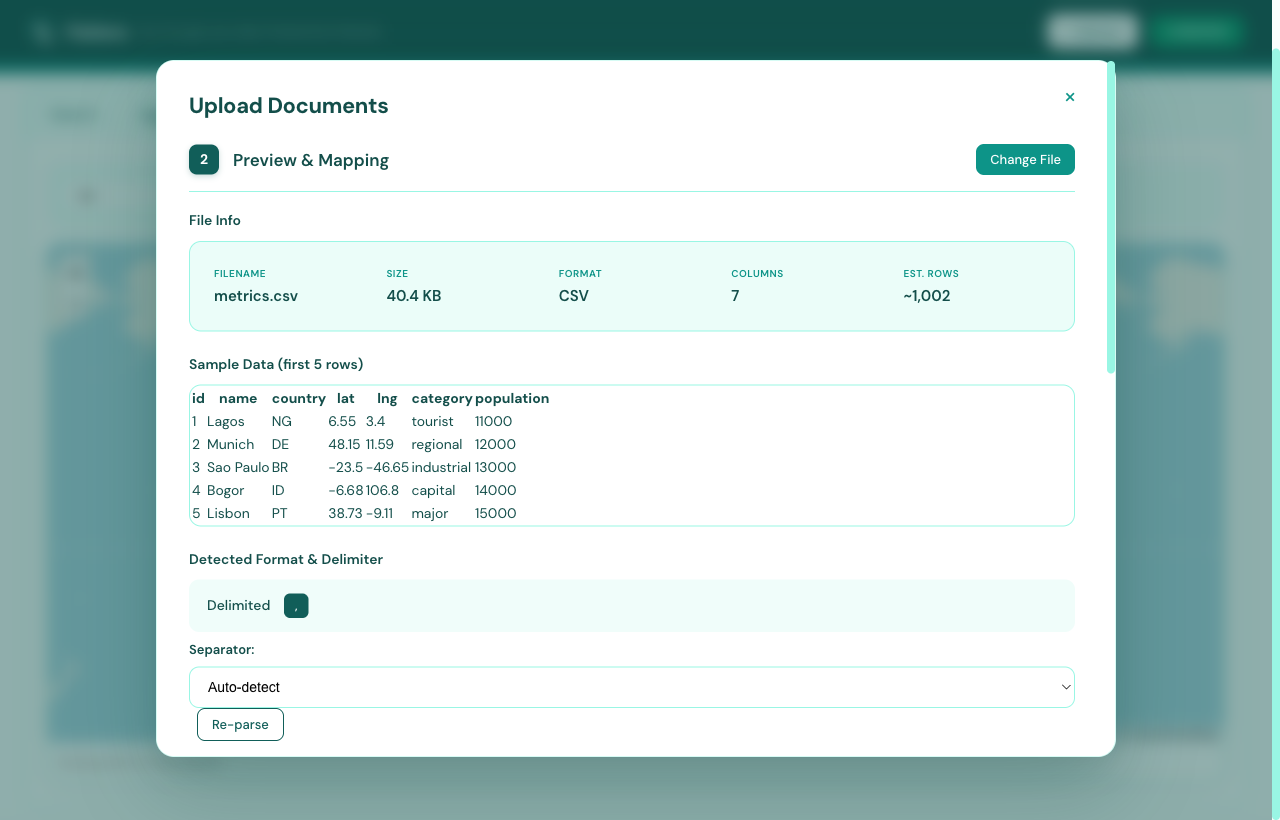
Flatlens — preview & mapping screen
Step 02 / Verify

Inspect before you commit.

Flatlens reads the first rows, detects file size, format and delimiter, and estimates total docs — so you know what's coming.

  • First-100-row preview
  • File size, format & column count
  • Auto-detected delimiter
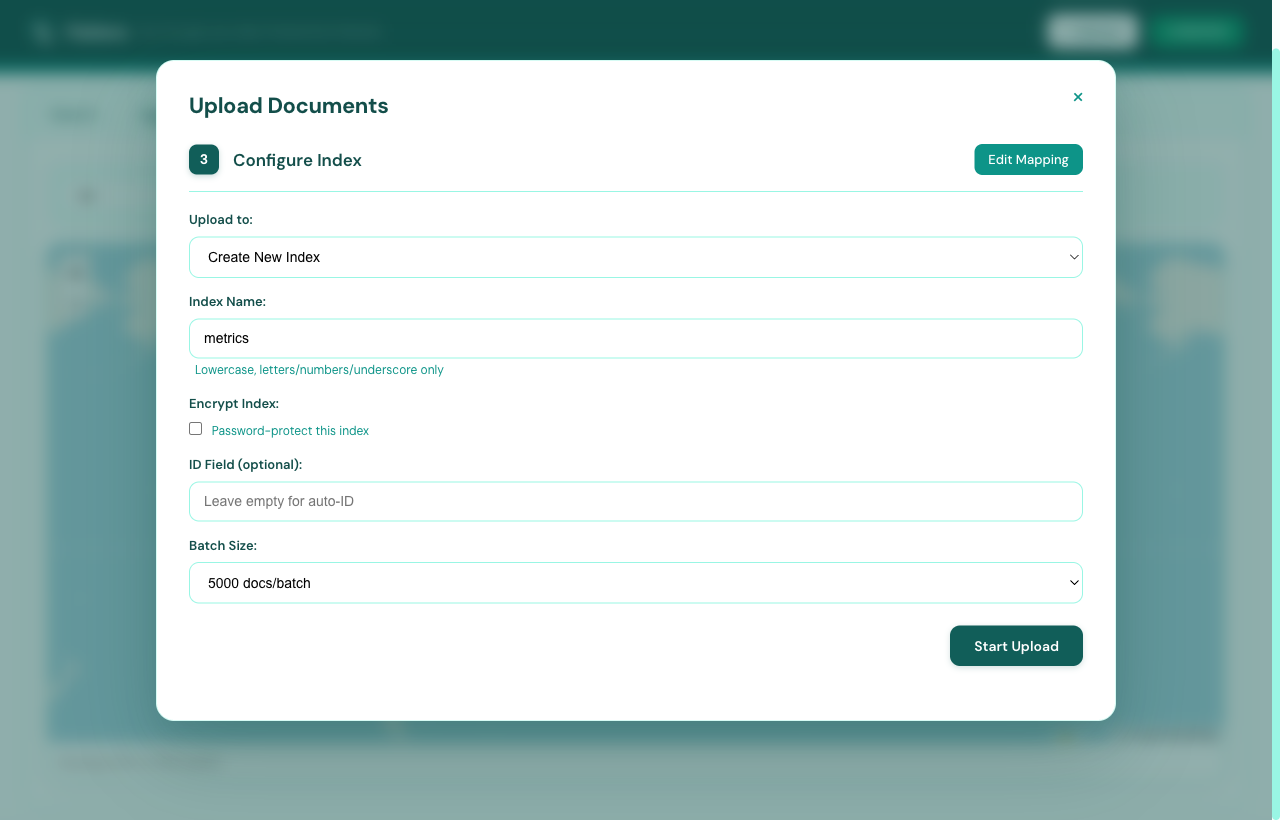
Flatlens — configure index screen
Step 03 / Configure

Name it. Lock it. Ship it.

Pick a target index, set a passphrase if the data is sensitive, choose an ID field, and tune the batch size. Defaults are sane.

  • Create new or append to existing
  • Optional ChaCha20 encryption
  • Custom ID field & batch size
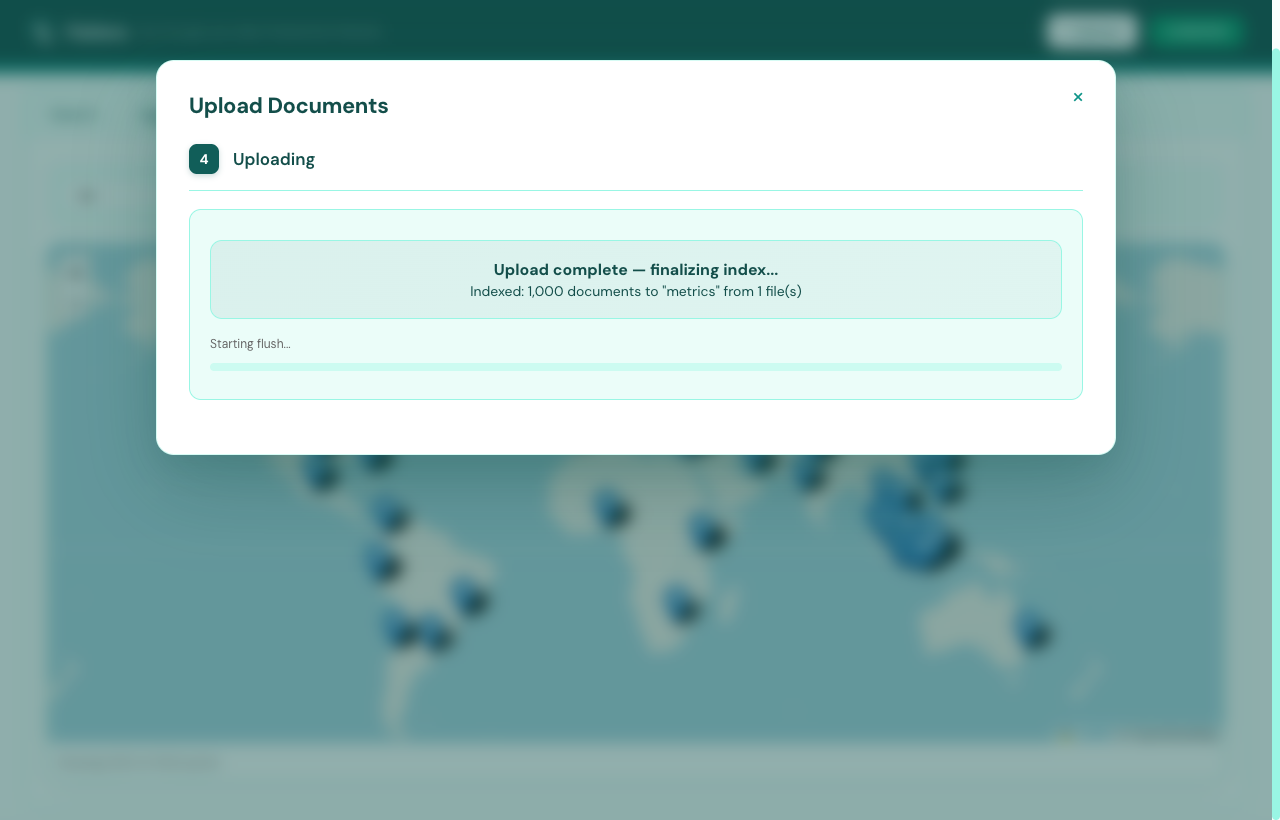
Flatlens — uploading progress
Step 04 / Watch it build

Live progress, honest ETA.

Streamed progress with elapsed, ETA, and live doc count. Nothing fake — the numbers come straight from the indexer.

  • Per-file progress bar
  • Elapsed & ETA, no estimation tricks
  • Resumable on interrupt
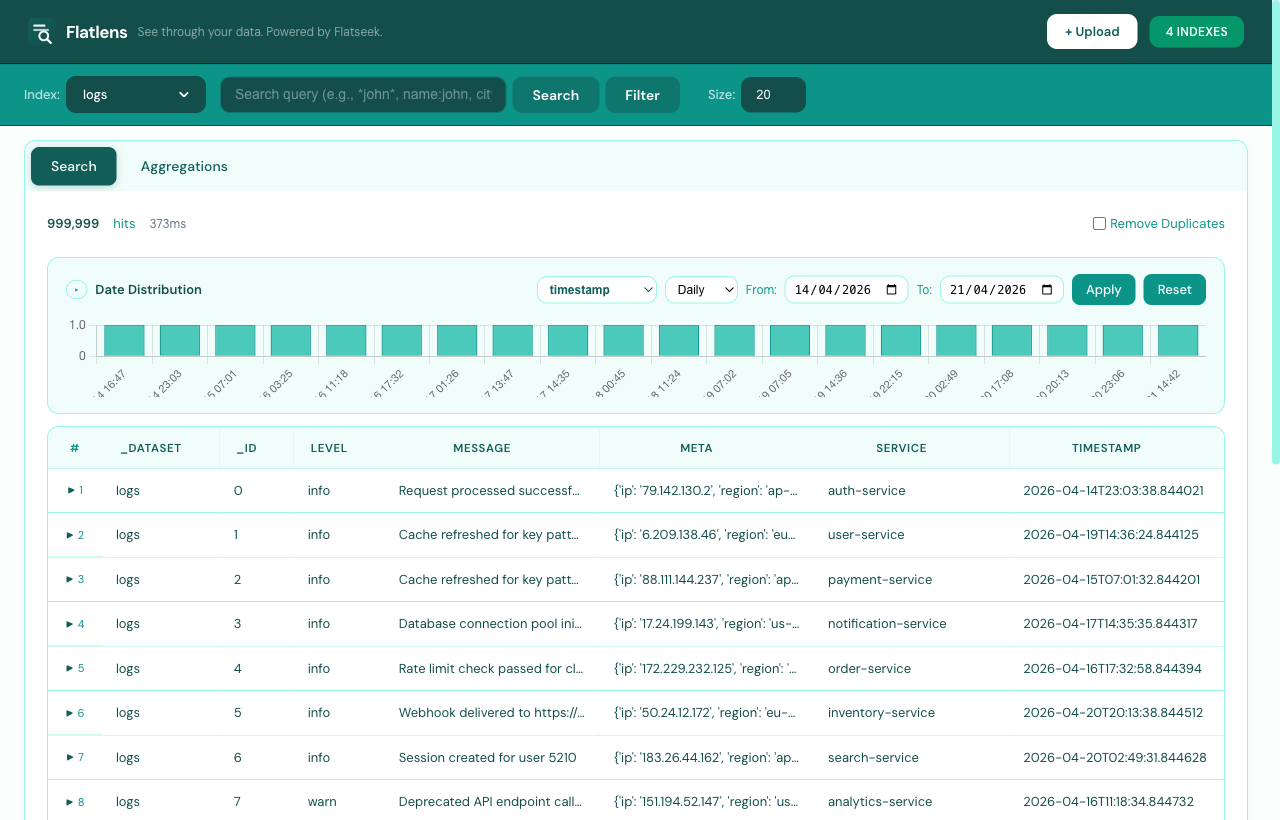
Flatlens — search results with date histogram
Step 05 / Search

Lucene-style queries, without a build step.

Type a query, hit Search, get hits in milliseconds. The date histogram on top updates with every refinement.

  • Wildcards, fuzzy, AND/OR/NOT
  • Live date-range distribution
  • Visual filter builder
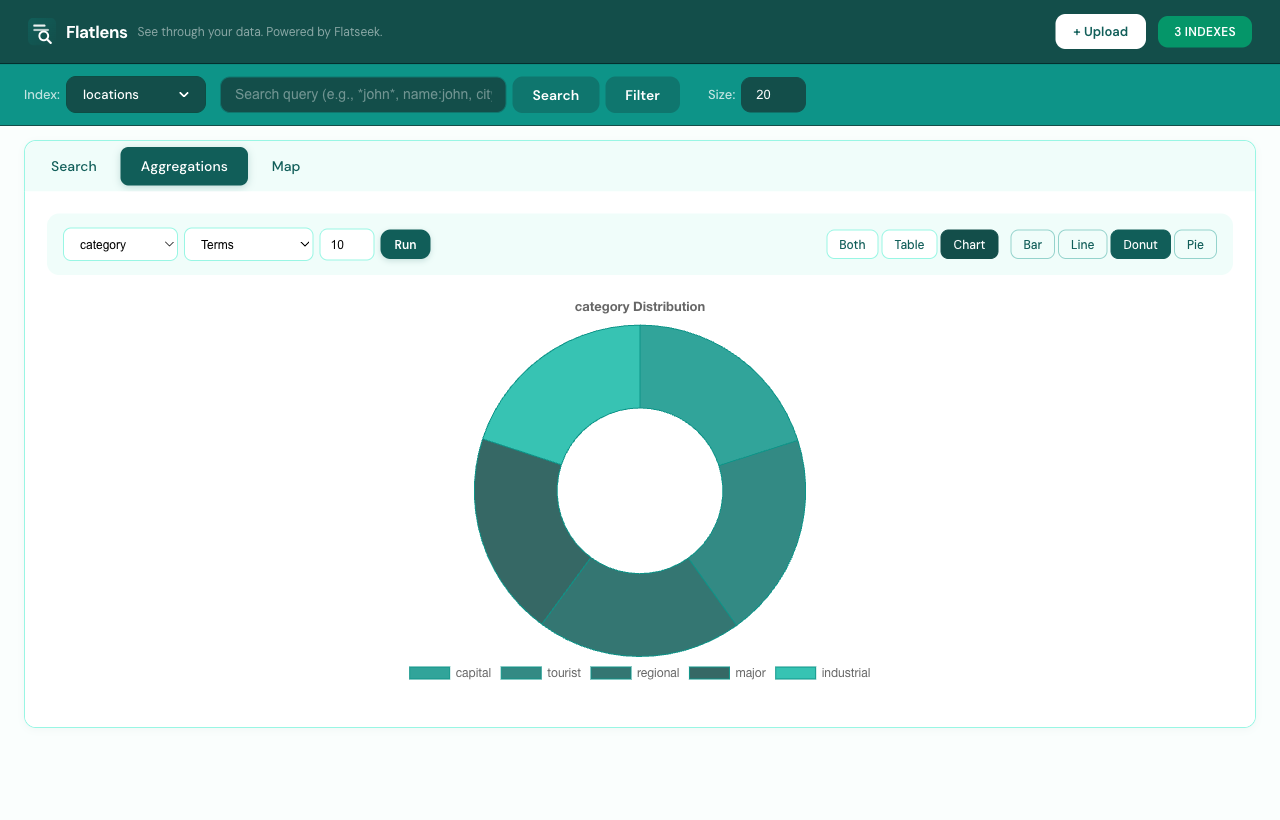
Flatlens — terms aggregation donut chart
Step 06 / Aggregate

Charts, on disk, in real time.

Pick a column, an aggregation type, and a chart shape. Aggregations run against the trigram index — no docs loaded into RAM.

  • Terms, stats, date-histogram, cardinality
  • Bar, line, donut, pie
  • Hover tooltips with exact counts
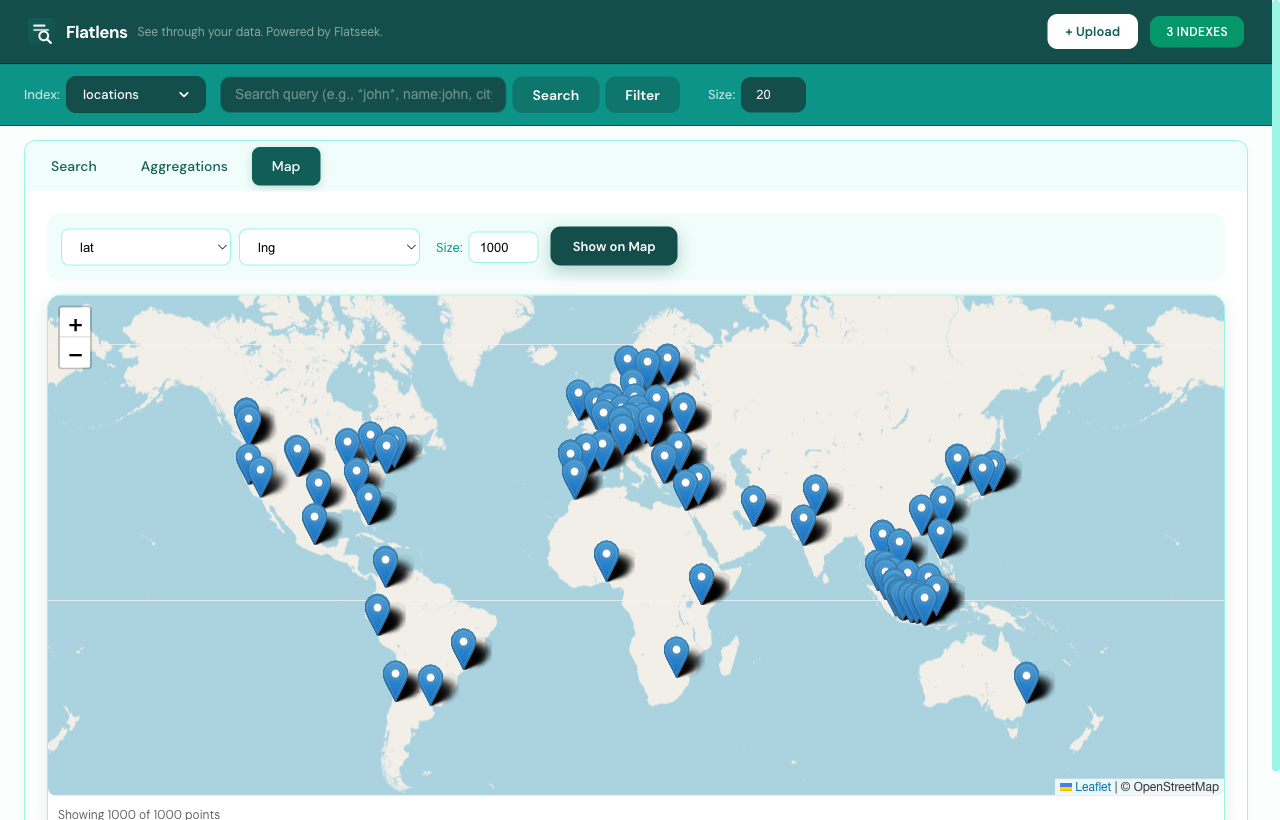
Flatlens — world map with location markers
Step 07 / Map

Plot every geo-point.

Pick lat & lng columns, set a sample size, and Flatlens drops your dots on a Leaflet map — with clustering up to 50,000 points.
  • Auto-detect lat/lng columns
  • Marker clustering up to 50K points
  • Filter by current search query
Get started

Stop over-engineering
your search.

One install command. Search on demand.